
IP Camera Guide 2026: Complete Buyer Manual for Network Security Cameras
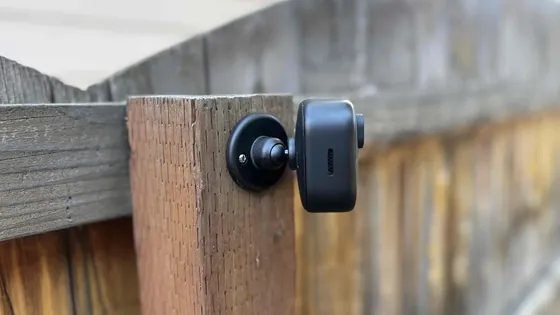
Table of Contents
If your new security cameras only work with one vendor's recorder, you paid for a cage, not a system. IP cameras are supposed to be open — standards-based, interoperable, upgradeable. The reality is that most buyers discover ONVIF compatibility, port settings and stream profiles only after the install, when it is too late to change anything. This guide walks through what an IP camera actually is, how ONVIF makes cameras interchangeable, what the specs really mean, and the installation checklist that prevents the classic "works with the app, useless everywhere else" failure.
Keep reading for more!
The Snapshot
- An IP camera is a network device with its own IP address, CPU and web server — it streams video over Ethernet or WiFi, and encodes it in-camera (H.264/H.265) instead of at a recorder.
- ONVIF (Open Network Video Interface Forum) is the interoperability standard: an onvif camera with onvif protocol support connects to any onvif compatible NVR/VMS, regardless of brand.
- IP cameras support up to 4K/8MP per channel, PoE power over a single cable, and remote access without port forwarding (P2P).
- An "ip camera system" = cameras + NVR (or VMS software) + storage; an "ip camera nvr" pair is the most common commercial deployment.
What Is an IP Camera?
An IP camera (Internet Protocol camera, sometimes called a network camera) is a digital video camera that sends and receives data over a computer network. Unlike an analog camera, which pushes a raw video signal down a coax cable to a DVR, an IP camera is a self-contained network appliance: it has its own processor, runs a small operating system, and serves video directly over Ethernet, WiFi or even cellular.
The name comes from the fact that each camera gets an IP address on your network, just like a computer or printer. You do not need a dedicated video cable — the camera uses the same network infrastructure as your laptops and phones. That one architectural difference drives every other difference in cost, flexibility and resolution.
What "network camera" means in practice
A network camera encodes video inside the camera and sends compressed streams (H.264 or H.265) to wherever you point them: an NVR, a NAS, a PC running VMS software, or the cloud. Because encoding happens in-camera, the network only carries compressed data — a 5MP camera at 15fps uses roughly 2-6 Mbps, manageable on standard Ethernet.
IP cameras also carry two-way audio, motion detection analytics, and even on-board SD storage for failover. The "camera ip" searches buyers run are usually about this class: standalone network cameras that integrate with an NVR or app ecosystem rather than closed proprietary systems.
IP Camera vs Analog Camera: What Changes
The IP vs analog question is the first fork in any CCTV purchase. The short version: analog (coax) systems are cheaper per camera but cap out around 1080p and need a DVR; IP systems cost a little more per camera but give you 4K, flexibility and expansion.
| Factor | Analog Camera + DVR | IP Camera + NVR |
|---|---|---|
| Signal | Analog video over coax (AHD/TVI/CVI variants for HD) | Digital over Ethernet/WiFi |
| Resolution | Up to 1080p (5MP with some coax HD standards) | 1080p to 4K/8MP per channel |
| Encoding | At the DVR | In the camera (H.265) |
| Cabling | Coax + separate power | One Ethernet cable (PoE) |
| Interoperability | Proprietary per vendor | ONVIF standard, mix brands freely |
| Camera intelligence | None — recorder does everything | Motion, audio, SD, analytics in-camera |
| Upgrade path | Replace cameras and recorder together | Swap cameras individually, keep NVR |
For existing coax installations, AHD DVR systems are the pragmatic upgrade — keep the cable, gain 1080p. For anything new, IP wins on resolution, integration and future-proofing.
ONVIF Explained: Protocol, Ports and Compatibility
ONVIF (Open Network Video Interface Forum) is the global standard for IP camera interoperability. An onvif camera speaks a common protocol for discovery, streaming, PTZ control and event handling, which means it works with any onvif compatible NVR, VMS or app — not just the camera vendor's own ecosystem.
What does "onvif compatible" actually guarantee?
ONVIF compliance has profiles. Profile S covers streaming (live video, recording, audio), Profile G covers recording and storage, Profile T (the modern one) adds H.265, analytics and 4K. When a spec sheet says "onvif protocol support," it usually means Profile S at minimum — enough to stream video into a third-party recorder. "Onvif compatible cameras" lists on Amazon or supplier pages mean the camera will be discovered and streamed by ONVIF clients.
What is ONVIF used for in a real system?
Three things: discovery (the NVR finds the camera on the network automatically), streaming (standard RTSP/ONVIF media), and control (PTZ, presets, events). The practical benefit: you can run an onvif camera into a different brand's NVR, add cameras one at a time over years, and replace a failing camera without touching the recorder.
ONVIF ports and setup
The default ONVIF port is 8000 (TCP), with RTSP on 554 for media. "Onvif port" searches usually come from integration work: when a VMS can't see a camera, it is often a firewall blocking 8000, or the camera's ONVIF user account being separate from the admin account (most cameras need you to create or enable an ONVIF user explicitly). If you are adding an onvif ip camera to a third-party NVR and it won't connect: check the ONVIF user, check port 8000/554 reachability, and confirm the camera and recorder are on the same subnet.
"Onvif meaning" in one line: the reason your cameras are not locked to one brand. Buy ONVIF-compliant cameras and you retain the freedom to choose your NVR, your VMS and your next camera vendor.
Types of IP Cameras: Bullet, Dome, PTZ, Mini
IP cameras come in four physical form factors, each tuned for a site type. The "best ip camera" decision is usually a form-factor decision first.
1. Bullet IP cameras
Bullet cameras are the outdoor workhorse: long cylindrical housing, visible and deterring, with long-range IR and optional varifocal lenses. An "ip camera outdoor" bullet with an IP66 rating survives weather and mounts on walls, poles or eaves. "Camera ip bullet" searches are buyers wanting this exact form factor.
2. Dome IP cameras
Dome cameras are compact, discreet and vandal-resistant — the glass dome is hard to pry, and the direction of view is hidden. They suit retail, offices and indoor public areas. A "commercial dome camera" or "hd ip camera" dome is the standard choice for shop interiors and reception desks.
3. PTZ IP cameras
PTZ (pan-tilt-zoom) cameras move and zoom under control — covering a large area with one camera, with presets that sweep key zones. "Ip camera with pan tilt and zoom" and "wifi camera ptz outdoor" searches target this class. A PTZ with 20x+ optical zoom covers a yard or parking lot that would need 4+ fixed cameras.
4. Mini / hidden / compact IP cameras
Mini cameras are small indoor units for discreet coverage — desk corners, shelves, counters. "Outdoor waterproof smart wifi camera mini ptz dome machine" searches reflect the all-in-one mini market. They trade image quality and durability for size; treat them as secondary coverage, not primary evidence.
Key Specs to Compare
Spec sheets hide the differences that matter. These five numbers separate a camera that works for years from one that disappoints at night.
| Spec | What it means | Good target |
|---|---|---|
| Sensor + resolution | Bigger sensor = better low light; resolution = detail | 1/2.7" or larger, 4MP-8MP |
| Minimum illumination | Lowest light for color/night | 0.1 Lux color (full-color) or 0.01 Lux IR |
| Codec | Compression efficiency = storage and bandwidth | H.265+ (up to 70% less than H.264) |
| Ingress protection | Weather rating for outdoor | IP66/IP67 outdoor |
| ONVIF profile | Interoperability level | Profile T (or S minimum) |
For "best ip camera" or "best ip cameras" listicles, these are the filters: resolution 4MP+, H.265, ONVIF Profile T, 0.1 Lux color capability, and a proven app. Everything else — brand, casing design — is secondary.
IP Camera Installation and Setup
"Ip camera fitting" and "ip camera installation" searches come from buyers who want the process, not the theory. Here is the field-proven sequence.
1. Plan the network
Each camera needs a network drop (or WiFi coverage). For PoE cameras, the cable run must be under 100m per IEEE 802.3af/at. Confirm the switch or NVR has enough PoE budget: 4MP PoE cameras draw 5-12W each; budget 15W per port for headroom.
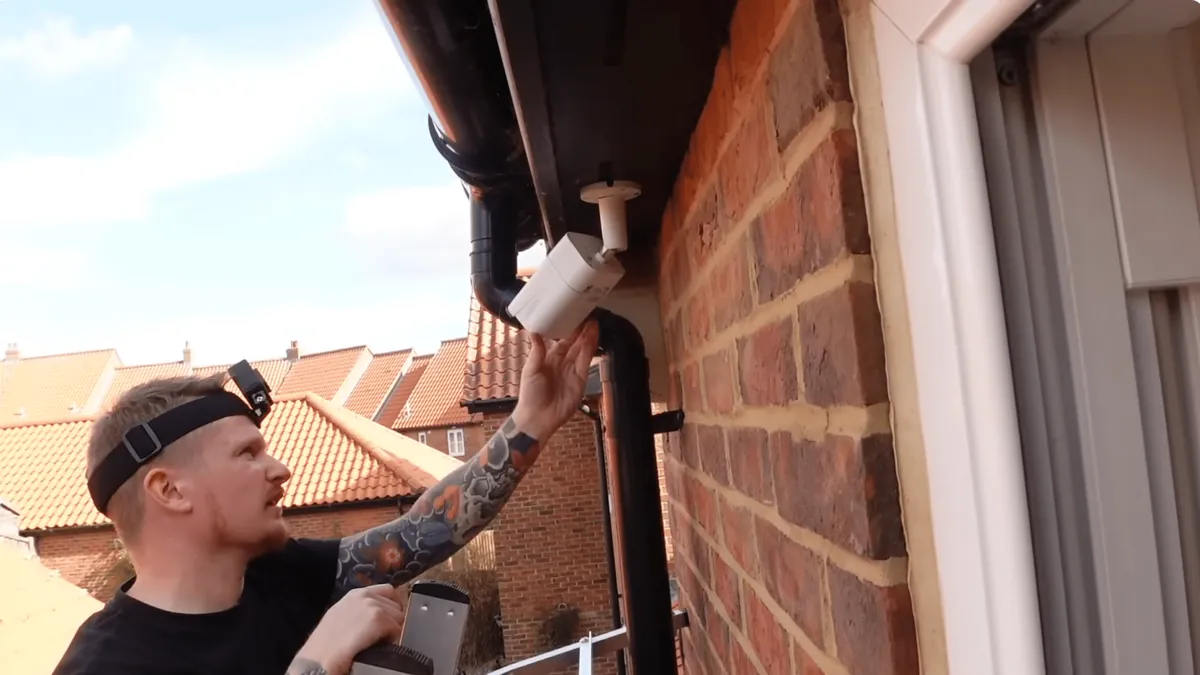
2. Mount and aim
Mount at 2.5-4m, angle down for face capture, avoid backlight (windows/sun behind the subject). For varifocal lenses, zoom to frame the zone, then lock. Use shielded cable outdoors and add surge protection at the building entry.
3. Power and connect
PoE: one cable carries power and data — plug into the switch/NVR port. WiFi cameras: pair via app, position within range of the access point. 4G cameras: insert SIM, confirm signal.
4. Configure
Set ONVIF user (if the NVR needs it), configure dual streams (low-bitrate sub-stream for remote viewing, main stream for recording), enable motion zones, and set the day/night schedule. Enable ONVIF port 8000 on the camera and open it on any firewall between camera and recorder.
5. Verify
Test from the NVR/app at night: color or IR mode as expected, faces identifiable, playback smooth. "Set up ip camera" done properly means the camera survives a power cycle and a network change without manual re-configuration.
Best IP Camera Choices by Use Case
Instead of a ranking that goes stale, here is the decision map by site type — matching form factor, resolution and power to the job.
| Use case | Recommended class | Why |
|---|---|---|
| Home / small office indoor | 4MP dome or mini, WiFi or PoE | Compact, discreet, easy app setup |
| Retail shop | 4-5MP dome (interior) + bullet (door) | Vandal-resistant inside, deterrent at door |
| Warehouse / yard | 5MP bullet + PTZ for large zones | Weatherproof, PTZ covers movement |
| Remote / no power site | 4G or solar-powered IP camera | Cellular + solar = zero cabling |
| High-value perimeter | PTZ with presets + full-color bullet | Active monitoring + color evidence at night |
The "hd ip camera" and "best ip camera system" buyers both end at the same place: a 4-8 camera system with an NVR, H.265 recording and remote app access — at factory-direct pricing for volume.
Wireless IP Cameras: WiFi, 4G and Solar-Powered
Not every site has Ethernet. The wireless IP camera family covers three power/network combinations, each solving a different constraint.
WiFi IP cameras
A wifi camera connects to your existing wireless network — no cable runs, install in minutes. "Wifi camera ptz outdoor" and "outdoor waterproof smart wifi camera" searches reflect the two most requested forms: outdoor weatherproof PTZ units and compact waterproof models. The trade-offs are real: WiFi bandwidth is shared (a 4-camera WiFi system may max out at 2MP per camera for smooth streaming), and signal reliability depends on distance and walls. For a home or small office, WiFi is the fastest route to coverage.
4G IP cameras
A 4G camera has a SIM slot and connects over cellular — the answer for construction sites, farms, parking lots and any location without broadband. Video quality is bounded by the data plan: at 2-4 Mbps per camera, a 50GB monthly plan supports roughly 3-8 hours of continuous streaming per day, so most 4G deployments use motion-triggered recording to stay inside plan limits. Look for dual-SIM units with an LTE antenna for weak-signal sites.
Solar-powered IP cameras
Solar cameras pair a panel + battery with a WiFi or 4G link — fully off-grid. A 6W panel with a 10-20Wh battery sustains a 2-4W camera with motion-only recording indefinitely in most climates. "Solar powered" cameras shine at fence lines, gates and farm perimeters where running power costs more than the camera.
Whichever wireless route you choose, confirm the free app supports both live view and playback without a subscription — that is the difference between owning cameras and renting them.
Troubleshooting Common IP Camera Problems
The questions that come back most often from field deployments — and the fixes that actually work.
Camera won't connect to the NVR
Check in order: (1) ONVIF user enabled on the camera — many cameras require creating an ONVIF-specific user, separate from the admin login; (2) port 8000 (ONVIF) and 554 (RTSP) reachable between camera and recorder — no firewall blocking, same VLAN/subnet; (3) credentials match what the NVR expects; (4) camera firmware supports the NVR's ONVIF profile — Profile T NVRs with Profile S cameras usually negotiate down, but some old firmware needs an update.
Video keeps buffering or dropping
Bandwidth or switch issue. Confirm the main stream bitrate fits the uplink (4MP H.265 ≈ 2-4 Mbps; 4 cameras ≈ 8-16 Mbps sustained). Use the sub-stream for remote viewing over limited connections, check for PoE power sag on long runs (over 60m, use a higher-class injector), and verify the switch is not dropping packets under load.
Poor night image
Check the day/night schedule and IR-CUT filter mode (set to Auto). If the camera has a fixed IR range, reposition for the zone you care about — IR bounce off walls/eaves washes out close-range detail. For sites where color matters after dark, a full-color low-light camera (0.1 Lux color, F1.0 aperture) beats any IR unit for evidence quality.
Motion alerts are useless (too many / too few)
Configure motion zones, not whole-frame detection. Exclude moving trees, roads and light flicker; set sensitivity per zone. With H.265 cameras that support smart events, use line-crossing or intrusion detection for perimeters — it cuts false alerts by 80-90% versus raw pixel motion.
IP Camera Questions Buyers Ask
1. Can I use an IP camera without an NVR?
Yes. Use the camera's SD slot with motion recording, or point the RTSP stream at VMS software (Blue Iris, Frigate, ZoneMinder) or a NAS. "Ip camera system" buyers usually want an NVR for centralized recording, but single-camera users can skip it.
2. Do IP cameras work with existing coax cables?
No — they need Ethernet (or WiFi). For coax sites, an AHD camera + DVR keeps the cable; some converters (EoC) run IP over coax but they are niche and expensive. If "ip camera vs analog camera" is your real question, see the table above.
3. What is the difference between ONVIF and RTSP?
RTSP is the media protocol (how video streams); ONVIF is the management standard (how devices are discovered and controlled). An onvif camera typically uses RTSP for media and ONVIF for discovery/control. Both are open standards.
4. How do I know if a camera is ONVIF-compliant?
Check the spec sheet for "ONVIF Profile S/G/T" and the ONVIF logo. Most branded IP cameras (and all FULLCOLORCAM units) are compliant — look for it explicitly, because some cheap WiFi cams skip ONVIF entirely and lock you into their app.
5. Can I mix camera brands on one NVR?
If all cameras are ONVIF-compliant, yes. That is the entire point of the standard. Add an onvif camera from vendor B to vendor A's NVR by adding it manually with the ONVIF user credentials.
6. Is an IP camera the same as a webcam?
No. A webcam is a USB device plugged into a computer that only works while that computer is on. An IP camera is standalone — it has its own processor, network connection and storage, and it keeps recording 24/7 with or without any computer running. The "webcam" comparison comes up because both capture video, but an IP camera is a surveillance device built for continuous operation, while a webcam is an accessory for calls and streaming.
7. How much bandwidth does an IP camera need?
A 4MP H.265 camera at 15fps needs roughly 2-4 Mbps for the main stream and 0.5-1 Mbps for the sub-stream. A 4-camera system: 8-16 Mbps sustained upload — fine for most business connections, but check your uplink before adding cameras, and enable motion-only recording to cut average bandwidth in half or more.
Buying Guide & Checklist
Use this checklist when comparing IP camera quotes — whether you are buying one camera or a container. Compare against the concrete IP camera product range.
- Resolution: 4MP minimum for identification; 8MP/4K for wide areas needing detail
- ONVIF: Profile T preferred, Profile S minimum — confirm in writing
- Codec: H.265+ per camera (halves storage vs H.264)
- Night capability: full-color (0.1 Lux color) or IR (0.01 Lux); state which
- Ingress: IP66+ for outdoor, IK10 for vandal-prone areas
- Power: PoE class 0/2/3, budget the switch/NVR accordingly
- App/remote: free P2P access, no per-camera subscription
- Surge: 6KV network surge protection on outdoor runs
- MOQ and lead time: for wholesale/volume, confirm both in writing
The Bottom Line
An IP camera system is only as open as its interoperability. Buy ONVIF-compliant cameras with H.265, real night capability and a free remote app, and the system stays upgradeable for a decade. Whether you are installing one camera or sourcing a container for resale, the same five specs decide everything: resolution, ONVIF profile, codec, night performance and weather rating.
NEXT STEP
Ready to Upgrade to Full-Color Night Vision?
Send us your requirements — our team responds within 24 hours with pricing and lead time.
Written by
Ray ChanCCTV Buyer's Guide Author · Full-Color Night Vision Specialist. Ray helps global importers and integrators source factory-direct security cameras.