
CCTV Camera System Kit Guide 2026: Complete Systems Explained
Table of Contents
Most camera system failures are not hardware failures — they are kit mismatches: cameras that outgrow the recorder, recorders that cannot hold a week of footage, and systems with no room to grow. A complete camera system kit removes that risk by bundling matched cameras, recorder, cables and power in one box. This guide walks through the types of systems (PoE, WiFi, coax, 4G), channel counts from 4 to 32, what no-subscription systems actually cost, and the installation sequence that gets a business site live in a day.
Keep reading for more!
The Snapshot
- A complete camera system kit bundles cameras + recorder + cables + power, matched and tested before shipping — no compatibility guesswork.
- Four system types by architecture: PoE (IP over Ethernet), WiFi (wireless IP), coax (AHD/DVR), and 4G/solar (cellular, off-grid).
- Channel counts: 4ch (small shop), 8ch (retail/office), 16ch (medium business), 32ch (school/factory). Buy one size up for headroom.
- No-subscription systems store locally (NVR/DVR/SD) with free remote viewing — typical savings vs cloud: $10-30 per camera per month.
- A complete 8-camera system (8 × 1080p + 8ch recorder + 2TB) runs roughly $400-900 retail; factory-direct volume pricing is 30-50% lower.
What Is a CCTV Camera System Kit?
A complete camera system kit — often called a CCTV kit or security camera bundle — is a packaged set of everything needed to run a surveillance system out of the box: cameras, a recorder (NVR or DVR), pre-terminated cables, power supplies, and usually an HDD bay (drive sold separately or included). The kit is matched at the factory: the recorder supports exactly the cameras it ships with, in the same standard and resolution.
The point of a kit is removing the three failure modes of piecemeal buying: (1) compatibility — camera and recorder from different standards that do not talk; (2) sizing — a recorder with too few channels or too little storage for the cameras; (3) missing parts — the cable, power or mounting hardware nobody remembered to order. A kit arrives with everything, tested, and the installer just mounts and connects.
For "ip camera system" and "camera ip system" searchers, a kit is the fastest route from decision to working system. For resellers and installers, kits are also the inventory unit: one SKU covers a whole site, and volume buying (MOQ 10-50 units) sets a predictable margin.
Types of Camera Systems: PoE, WiFi, Coax, 4G
The first decision is the architecture. Four types cover almost every deployment, and each has a clear best-use case.
| System type | How it connects | Best for | Typical cost (8-cam) |
|---|---|---|---|
| PoE IP system (NVR) | Ethernet cable carries power + data | New installs, offices, retail, warehouses | $500-1,200 |
| WiFi system (NVR + wireless cams) | Cameras join WiFi network | Rentals, finished interiors, quick installs | $400-900 |
| Coax system (DVR + AHD) | Coax cable, HD-over-coax standard | Retrofit of existing coax buildings | $350-800 |
| 4G/solar system | Cellular + battery/solar | Construction sites, farms, remote sites | $600-1,500 |
PoE systems — the default for new builds
A PoE NVR kit is the most common "ip camera system" purchase: the NVR has a built-in PoE switch, one cable per camera, plug-and-go. The "wifi 4ch ip camera nvr kit" variant swaps wired for wireless cameras where cabling is impractical. "Best wired security camera systems" searches are buyers who explicitly prefer the reliability of cable.
Coax systems — the retrofit champion
The "ahd dvr 8 camera kit" buyer has coax in the walls and wants HD without a rewire. The kit reuses existing cable runs and delivers 1080p immediately — the cheapest upgrade path in CCTV.
4G/solar — the no-infrastructure option
For sites with no Ethernet and no power, a 4G camera with a solar panel and battery runs fully off-grid. "Analog video surveillance system" searchers often end up here when their site has nothing to connect to.
Channel Counts: 4ch, 8ch, 16ch, 32ch
Channel count = how many cameras the recorder handles simultaneously. Size it for today plus 25-50% headroom.
| Channels | Typical site | Cameras included | Drive size |
|---|---|---|---|
| 4ch | Small shop, apartment, office floor | 4 | 1-2TB |
| 8ch | Retail, small warehouse, 2-floor office | 6-8 | 2-4TB |
| 16ch | Medium business, school wing, parking lot | 12-16 | 4-8TB |
| 32ch | School, factory, multi-zone warehouse | 24-32 | 8TB+ |
The "best nvr camera system" and "network video recorder system" searchers are sizing this exact decision. Rule of thumb: if you think you need 6 cameras, buy the 8ch kit; the spare channels cost little and save a recorder replacement when the site grows.
No-Subscription Camera Systems
"Best home camera system without subscription", "home camera systems no subscription" and "camera system without subscription" searches all ask the same question: can I run a complete system with no monthly fees? The answer is yes — with local recording.
How no-subscription systems work
Cameras record to the NVR/DVR's hard drives (or SD cards in wireless systems). Remote viewing rides a free P2P connection through the vendor app — no cloud storage, no per-camera fee. The hardware is bought once; the app and P2P relay are included.
The cost math
Cloud-recorder subscriptions typically run $10-30 per camera per month. A 16-camera system at $15/camera/month = $2,880/year — enough to buy a second complete system with drives every year. Local recording with free remote access wins from month one, and it wins on privacy: footage never leaves the site unless you send it.
What to verify in a no-subscription kit
Confirm the app's live view, playback and motion alerts are free (not freemium-gated). Confirm local storage is included (HDD bay, not cloud-only). Confirm P2P remote access needs no port forwarding. If the spec sheet says "cloud plan required" anywhere, it is not a no-subscription system.
Camera System Cost: What to Budget
"Camera inventory system cost small business implementation" and "security camera price" searchers want numbers. Here is a realistic budget by site size — equipment only, before installation labor.
| System size | Equipment cost (retail) | Factory-direct volume |
|---|---|---|
| 4-camera system | $200-450 | $150-300 (MOQ 10+) |
| 8-camera system | $400-900 | $280-600 |
| 16-camera system | $900-2,000 | $600-1,300 |
| 32-camera system | $2,000-4,500 | $1,300-2,900 |
Installation labor adds $50-150 per camera for a professional integrator, or zero if you self-install (kits are designed for it). For a small business comparing "top 10 camera security systems", the total cost of ownership number that matters is equipment + storage + five years of any subscription — and no-subscription local systems dominate that math.
CCTV System Installation Step by Step
"Cctv system installation" is a high-volume search because kits are DIY-friendly. The sequence below gets a site live in a day.
1. Plan camera positions
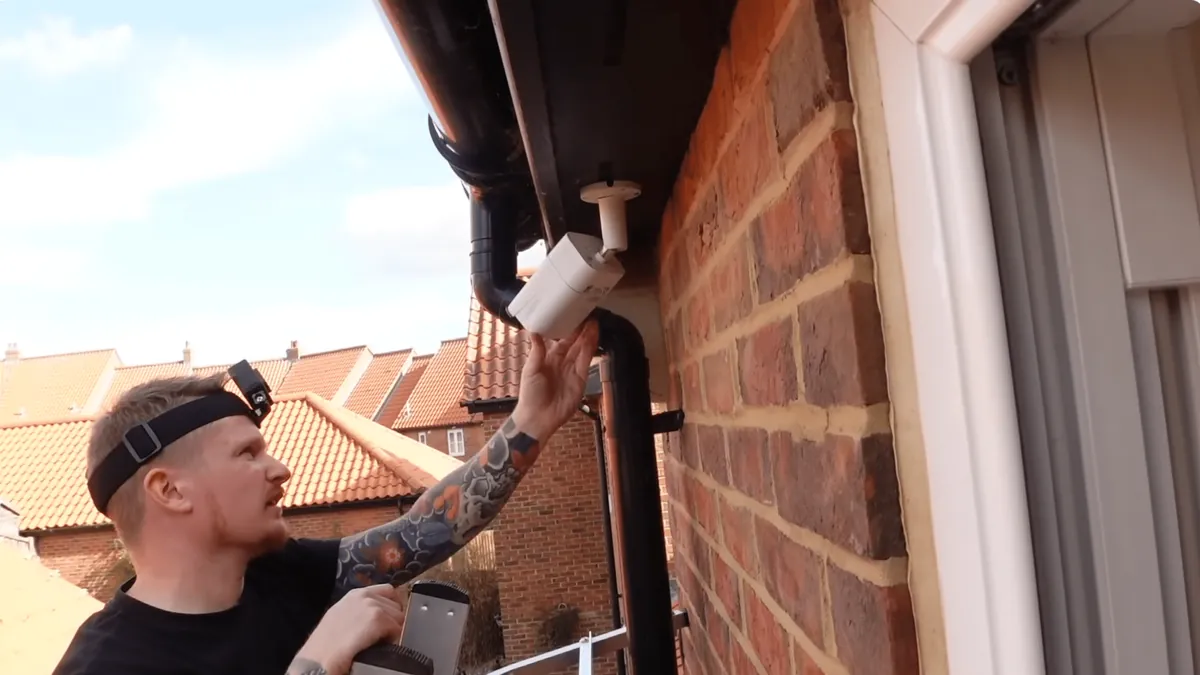
Map entrances, exits, cash areas, blind corners and perimeters. Aim for face-capture height (2.5-4m) and avoid backlight. For retail, cover the till and the door; for warehouses, aisles and dock doors.
2. Run cables (PoE/coax) or pair cameras (WiFi)
PoE: one cable per camera, keep runs under 100m, use shielded cable outdoors. Coax: RG59 for under 300m, terminate BNC cleanly. WiFi: pair each camera in the app, place within access-point range (2.4GHz penetrates walls better).
3. Mount and connect cameras
Fix mounts, attach cameras, plug into the recorder's ports or network. Confirm each camera powers up and streams before finalizing placement.
4. Configure the recorder
Insert the HDD, set H.265, name channels by zone (e.g. "Front door", "Till"), enable motion zones, and set the recording schedule. Create the app account and scan the recorder's QR code for P2P remote access.
5. Verify and hand over
Check every camera at night, test playback from the app on cellular data, and walk the site to confirm coverage. A complete system installed this way typically takes 4-8 hours for 8 cameras.
Retail and Business Camera Systems
"Retail store camera security systems" buyers need more than cameras — they need evidence-grade coverage and loss-prevention basics.
What retail actually needs
Cover the till (face + transaction), the door (entry/exit), aisles (for theft patterns) and the stockroom. Resolution matters at the till: 5MP there, 1080p elsewhere is a common split. Night capability matters for after-hours break-ins — full-color night vision cameras keep color evidence that IR black-and-white loses.
Loss prevention basics
Visible cameras deter; hidden or discreet cameras catch. A "best security camera system without subscription" for retail usually pairs visible domes with a couple of discreet cameras, motion alerts to the manager's phone, and 30+ days of local storage for evidence before police review. The system pays for itself on one prevented incident.
Expanding and Upgrading a System
A kit is not a dead end — it is a foundation. Expansion happens three ways.
1. Add cameras within the kit's channels
If the recorder has spare channels (e.g. 8ch kit with 6 cameras), add matching cameras — they plug into the recorder/network and appear automatically. This is why buying one size up at purchase time pays off.
2. Add storage
More HDD bays or bigger drives extend retention. Going from 2TB to 8TB multiplies retention by 4x at the same bitrate. Motion-only recording multiplies it further (typically 2-3x).
3. Upgrade cameras selectively
Swap the till camera to 5MP, add full-color night vision at the perimeter, replace a failing unit with a newer ONVIF model. In IP systems, ONVIF compliance guarantees the new camera works with the existing recorder. In coax systems, stay within the same AHD/TVI/CVI standard.
DIY vs Professional Installation
Kits blur the line between self-install and integrator work. The honest breakdown saves both money and regret.
What DIY covers well
Homes and small businesses with clean layouts: mount cameras, run cables (or pair WiFi), configure the recorder via the app. A 4-8 camera PoE or WiFi kit is genuinely DIY-friendly — most buyers complete it in a day. The kit documentation and app walkthroughs have improved to the point that "cctv system installation" searches mostly end in self-install for small sites.
When to call a professional
Three situations: (1) multi-storey or multi-building sites needing structured cabling and a network plan; (2) sites with difficult runs (concrete, underground, long perimeters) where termination and surge protection matter; (3) anything with compliance requirements — retail chains, schools, government-adjacent work — where an integrator's documentation and warranty matter for the contract. Professional installation adds $50-150 per camera but brings a liability chain and a support number.
The hybrid approach
Self-install the cameras and cabling, then have an integrator commission the recorder, network and remote access. This splits the work where each side is strongest and typically halves the professional bill.
System Security and Privacy
A camera system is a network device, and unsecured cameras are how botnets are built. Three defaults to fix on day one.
1. Change default credentials
Every camera and recorder ships with default admin credentials. Change them before connecting to the network — this one step eliminates the majority of camera compromises. Use a per-device password, not one reused across the system.
2. Keep firmware updated
Recorder and camera firmware patches fix known vulnerabilities. Confirm the vendor publishes updates and the kit's firmware-update path works (most embedded recorders update from a local USB or the app). A system that cannot update is a liability from day one.
3. Network hygiene
Put cameras on a separate VLAN or subnet from business PCs where the network allows it. Disable UPnP and port forwarding on the recorder — P2P remote access needs neither, and open ports are how cameras get scanned and hacked. If the recorder was previously configured with port forwarding, remove those rules.
For B2B buyers sourcing kits for resale, these three points are the difference between a product line and a liability line — confirm the manufacturer documents credential policy and firmware support before stocking a brand.
Common System Mistakes and How to Avoid Them
Most "system doesn't work" tickets trace to a handful of repeatable errors. Fix these and the system works.
1. Undersized PoE budget
Every camera draws 5-12W; a 4-port recorder switch rated for 4 × 15W cannot power 4 × 12W PTZ cameras. Add up camera draw before buying and leave 20% headroom. "Best wired security camera systems" that fail in the field usually fail here.
2. Wrong cable for the run
Ethernet beyond 100m needs a switch or extender; coax beyond 300m needs RG6. Ignoring distance limits produces intermittent video that is hard to diagnose. Measure the runs first.
3. Recording schedule misconfigured
Systems set to motion-only with misconfigured zones record nothing when it matters. Test the exact scenario you care about — a person walking through the protected zone at night — before signing off.
4. No surge protection outdoors
Outdoor camera runs without surge protection die in thunderstorms. Confirm the kit includes 6KV network surge protection on outdoor paths, and add building-level protection for long perimeter runs.
5. Storage sized for yesterday
A 2TB drive on an 8-camera 1080p system holds ~50 days — fine until a holiday weekend fills it. Budget for 30 days minimum at expected bitrate, and enable motion-only recording to stretch it.
Camera System Questions Buyers Ask
1. How long will my recording last?
Divide drive capacity by the daily footprint. 8 cameras at 1080p H.265 ≈ 40GB/day → 2TB holds ~50 days, 4TB ~100 days. Halve it at H.264, multiply 2-3x with motion-only recording.
2. Do I need a subscription?
No, if the kit records locally and the app is free. Subscription is only required for cloud-storage plans — avoid them unless you specifically need off-site backup.
3. Can I install it myself?
Yes — that is what kits are for. PoE kits need basic cable running; WiFi kits need nothing but a phone app. Allow 4-8 hours for 8 cameras including mounting and configuration.
4. What if I need more cameras later?
Buy the kit with spare channels (8ch for 6 cameras), or add a second recorder. Both work; spare channels are cheaper.
5. Wireless or wired — which is more reliable?
Wired (PoE/coax) wins on reliability: no interference, no dropped links, consistent bandwidth. WiFi wins on install speed. For businesses, wire the critical cameras and use WiFi only for low-risk coverage.
6. What is the best system for a home?
A 4ch PoE kit with 1080p-4MP cameras, 1-2TB and no subscription covers a typical home: front door, back door, garage, driveway. Add full-color night vision if nighttime evidence matters to you.
7. How long does installation take?
A WiFi kit: 2-4 hours for 4-8 cameras, mostly mounting and app pairing. A PoE kit with cable runs: 4-8 hours for 8 cameras including termination and configuration. Add a day for multi-building sites or runs over 100m that need switches. Most installers quote by the camera — typically 30-45 minutes each including cabling.
8. Can I watch my system from my phone anywhere?
Yes — that is the standard P2P feature on every kit worth buying. The recorder or cameras connect outbound to the vendor's relay, and the app reaches them through it: no port forwarding, no static IP, no DDNS. Confirm the app supports live view, playback, motion alerts and multi-user access before buying.
9. What resolution do I actually need?
1080p identifies a face at roughly 3-5m in good light; 4MP/2K extends that to 6-8m; 5MP/4K to 8-12m. The till camera in a shop should be the highest-resolution camera in the system. Everywhere else, 1080p at H.265 balances cost and storage.
10. Should I buy one big system or several small ones?
One recorder with spare channels beats several small systems: single interface, single app, centralized storage, and one point of failure to manage. Go multi-recorder only when sites are physically far apart (each site gets its own kit) or when channel count exceeds a single unit (64+).
Buying Guide & Checklist
Use this checklist when comparing camera system kits — from a single site to a wholesale line. Compare against the concrete complete CCTV kit options.
- Architecture: PoE / WiFi / coax / 4G — match to site wiring and infrastructure
- Channels: current cameras + 25-50% headroom
- Resolution: 1080p baseline, 4-5MP at critical points (till, entrance)
- Codec: H.265 (not just H.264) for storage efficiency
- Storage: HDD included or SATA bay confirmed; size for 30+ day retention
- Subscription: zero — local recording + free P2P app, confirm in writing
- Night: full-color night vision at perimeter/critical zones
- Weather: IP66 outdoor, 6KV surge protection
- Wholesale: MOQ, mixed-SKU kitting, lead time, spare-parts support
The Bottom Line
A complete camera system kit is the fastest, lowest-risk way to get a site covered — matched parts, no compatibility surprises, and no subscription trap. Choose the architecture by the building (PoE for new, coax for retrofit, WiFi for speed, 4G for remote), size the channels one step up, record locally, and the system earns its cost on the first incident it documents.
NEXT STEP
Ready to Upgrade to Full-Color Night Vision?
Send us your requirements — our team responds within 24 hours with pricing and lead time.
Written by
Ray ChanCCTV Buyer's Guide Author · Full-Color Night Vision Specialist. Ray helps global importers and integrators source factory-direct security cameras.